
The real question: is it a website, or is it a product?
Custom-Built vs No-Code Website: How to Decide in 2026 (Founder's Guide)
No-code (Framer, Webflow) or custom development? A founder's framework on cost, speed, SEO and limits, with real examples from Life Designer projects.
Quick answer: Choose a no-code website (Framer, Webflow) when you mainly need a fast, beautiful, SEO-friendly marketing site that your team can edit without developers. Choose custom development (React/Next.js, MERN) when the site is really a product: user logins, payments, dashboards, bookings, complex integrations or business logic. Many startups do both: a no-code marketing site in front, and a custom-built app behind it. No-code is usually cheaper and faster to launch; custom costs more upfront but removes platform limits.
By the Life Designer team · Reviewed by Drix, Co-Founder & Head of Marketing · Last updated: October 2026
"Should we build it in Framer or get it coded?" is one of the first questions founders ask us, usually with a budget in one hand and a launch date in the other. It's the right question, but it's usually asked about the wrong thing. The real question is: is this a website, or is it a product?
Below is the framework we use with clients to answer it, with real projects where we chose each route.
What's the difference between a no-code and a custom-built website?
A no-code website is designed and published on a visual platform such as Framer or Webflow. Hosting, security, CDN and a content management system (CMS) come built in. Designers can build it pixel-perfect without writing application code, and your marketing team can edit pages and publish blogs themselves.
A custom-built website or web app is written in code (for example React, Next.js, Node.js, or the MERN stack), hosted on infrastructure you control, and can do anything you can program: user accounts, payments, role-based dashboards, CRM workflows, APIs.
In between sit platforms like Shopify (for e-commerce) and WordPress, which mix templates, plugins and code.
Factor | No-code (Framer, Webflow) | Custom (React/Next.js, MERN) |
|---|---|---|
Best for | Marketing sites, landing pages, blogs, portfolios | Web apps, portals, dashboards, marketplaces |
Time to launch | Usually 2–6 weeks | Usually 8–20 weeks |
Typical build cost in India | ₹80,000 – ₹6 lakh | ₹2 – 15 lakh+ |
Who edits content | Your marketing team, visually | Developers, or a CMS you add |
Logins, payments, business logic | Limited, via third-party tools | Anything you can build |
Hosting and security | Included in the plan | You manage it |
Platform dependency | High | Low: you own the code |
When is a no-code website the right choice?
No-code is usually the better choice if most of these are true:
The site's job is to explain, persuade and capture leads, not to run your operations.
Your marketing team needs to publish landing pages and blogs without a developer.
You need to launch in weeks, not months.
Your data needs are simple: forms, a blog, a case-study CMS, maybe a job board.
You'll run ads and want to spin up campaign pages quickly.

Example from our work: for Ultrafast Chargers, an EV-charging brand, we designed and built the site on no-code with custom motion graphics, responsive layouts and on-page SEO. For Life Resilience Training, we created the brand identity and a no-code website together. In both cases the business needed a credible, fast-loading site the team could own, not custom software.
When do you need custom development?
Go custom when the website has to do work, not just present information:
User accounts and dashboards (students, vendors, patients, partners).
Payments, bookings and scheduling with automated confirmations.
Business logic: approval flows, pricing calculators, subsidy or compliance workflows.
Deep integrations with ERPs, CRMs or internal systems.
Large or relational data that outgrows CMS item limits.
A mobile app that shares the same backend.
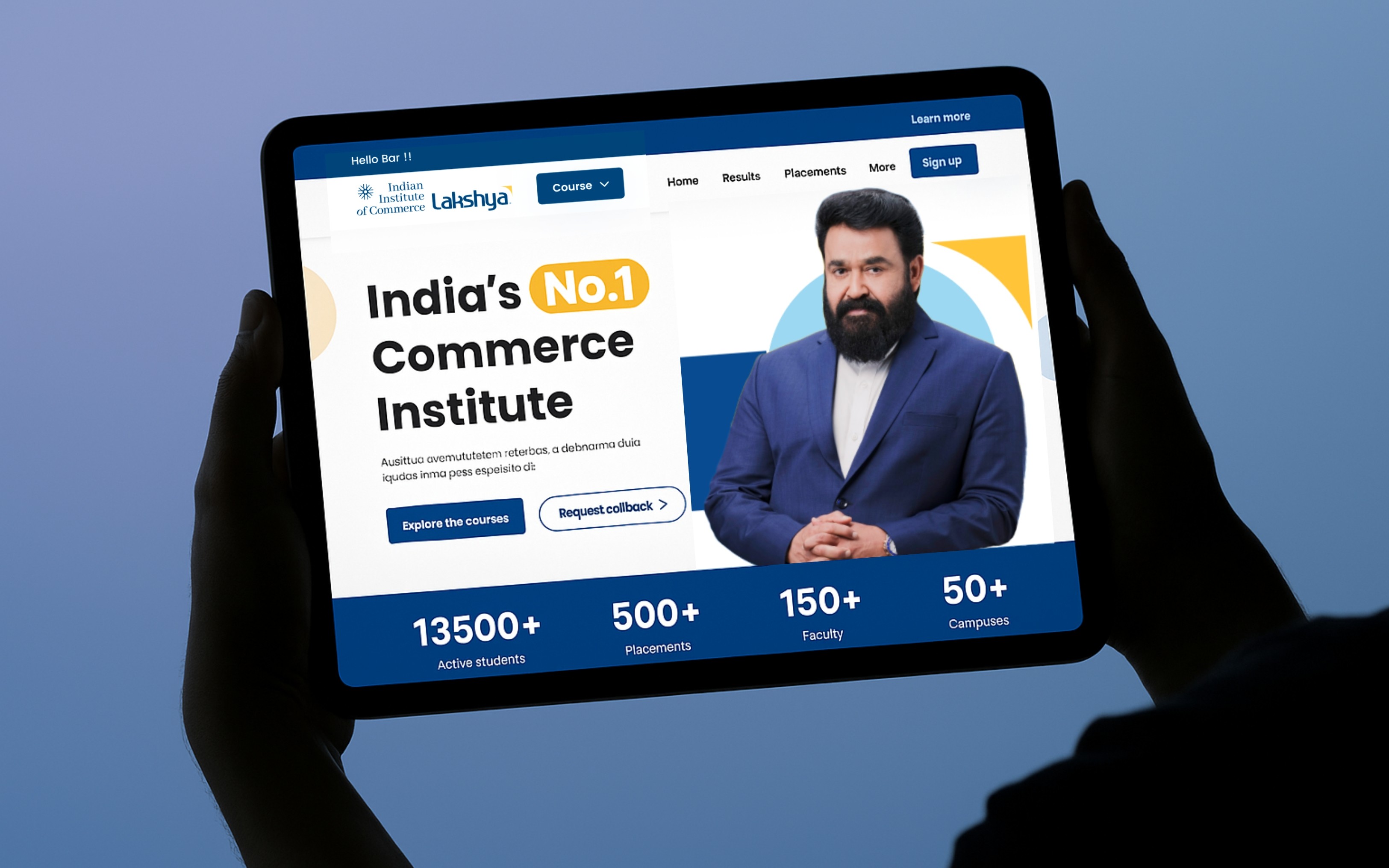
Example from our work: Lakshya (Indian Institute of Commerce Lakshya) needed course discovery, enrolment, booking management, online payments, automated confirmations, student dashboards and admin/CRM tools in one place. A no-code site couldn't carry that, so we built a responsive MERN-stack web app. It launched in 8 weeks, and the client reported 80% more bookings without calls.
Similarly, Rengy Partner is a custom Android and iOS app for solar vendors covering onboarding, financing, procurement, installation tracking and subsidy workflows. It was delivered in 12 weeks and, per the case study, has onboarded 100+ solar vendors and managed 1,000+ installations and projects.
Is no-code cheaper than custom development?
For a marketing website, almost always, at least at launch.
Build cost: Indian pricing guides put freelance Webflow builds around ₹80,000–₹2 lakh and small-agency builds around ₹2–6 lakh, while agency-built custom web apps typically run ₹2–15 lakh+.
Running cost: no-code platforms charge a monthly site plan (Framer lists $10/month Basic and $30/month Pro; Webflow's paid site plans start around $15/month billed yearly), but hosting, SSL and CDN are included. Custom builds need hosting, monitoring and a developer for updates.
Change cost: on no-code, a marketer can add a landing page in an afternoon. On a custom site, the same change usually needs a developer.
For reference, Life Designer's website design and development projects run ₹3–10 lakh, and custom product UI/UX and app builds run ₹20–80 lakh depending on complexity and AI integration.
Where no-code gets expensive is when you force it to behave like a product: piling on third-party tools, workarounds and automation glue. At that point, custom is often cheaper over two or three years.

What about SEO, speed and AI search visibility?
Both routes can rank well. What matters is execution:
Clean heading structure (one H1, logical H2/H3s), descriptive page titles and meta descriptions.
Fast load times and good Core Web Vitals.
Server-rendered HTML that search engines and AI crawlers can read.
Structured data (schema) for articles, FAQs, organisation and products.
Framer and Webflow publish static, pre-rendered pages, which makes them strong for content and blogs out of the box. A custom React app needs server-side rendering (for example Next.js) to be equally crawlable. Skip that, and a beautifully built custom site can stay nearly invisible to search engines and AI assistants.

What are the limits of no-code platforms?
Check these before you commit:
CMS limits: Framer's Pro plan, for example, lists 10 CMS collections and 2,500 CMS items before add-ons. Large catalogues or directories may outgrow it.
Logic and permissions: member areas, roles and complex forms are limited or need external tools.
Platform dependency: you can't simply export a Framer or Webflow site and host it elsewhere with full functionality.
Per-site pricing: localisation, extra bandwidth and more CMS items are paid add-ons.
Can I start with no-code and move to custom later?
Yes, and for many startups it's the smartest path:
Validate with a no-code marketing site and landing pages.
Build the product (app, portal, dashboard) in custom code once you know what users need.
Keep the marketing site on no-code so the growth team stays fast, and link it to the app on a subdomain such as app.yourbrand.com.
E-commerce is a separate case. For Naivo Coffee, a craft coffee brand, we built on Shopify: custom-designed and responsive, but on a platform made for catalogues, checkout and inventory.

A quick decision checklist
Count how many of these apply to you:
Users need to log in.
You'll take payments or bookings on the site (beyond a simple checkout link).
You need role-based dashboards or admin tools.
You'll integrate with an ERP, CRM or internal database in real time.
You expect more than a few thousand CMS records.
0–1 yes: go no-code. 2–3 yes: no-code marketing site + custom app. 4–5 yes: custom development.
Frequently asked questions
Is Framer or Webflow better for a startup website?
Both are good. Framer tends to be faster for design-led marketing sites and animation; Webflow offers more mature CMS and e-commerce options. Choose based on who will maintain it and how much CMS content you'll have.
Will a no-code website hurt my Google rankings?
No. Rankings depend on content quality, page structure, speed and authority, not on whether code was written by hand. Well-built Framer and Webflow sites rank competitively.
How long does each option take to build?
A focused no-code marketing site typically takes 2–6 weeks including design. A custom web app usually takes 8–20 weeks depending on features; our Lakshya platform took 8 weeks and Pepagora's B2B marketplace rebuild took 5 months.
Do I own the code on a no-code platform?
You own your content and design, but the site runs on the platform. With custom development you own the codebase outright, which matters if investors or acquirers will ask about IP.
Can a no-code site connect to my CRM?
Usually yes, for forms and lead capture, through native integrations or tools like Zapier and Make. Real-time, two-way business logic is where custom development becomes necessary.
The bottom line
If your website's job is to win attention and leads, no-code gets you live faster, cheaper and with less dependence on developers. If your website is the product, invest in custom development from the start. And if you're both, split them.
Not sure which side you're on? Book a free strategy call and we'll map your requirements to the right build. See our no-code websites and website and app development services for more.
Sources: Framer pricing · Webflow pricing · ColorWhistle – Webflow cost in India · Fuzen – Website development cost in India 2026